
 Download for the office Mac (264 MB)
- Current version
- 3.0.0
- Software maker
- iZotope
- Language support
- English
- License
- K'ed by MORiA
- macOS versions
- macOS 13.4 or later
- Processor type
- Apple Silicon, Intel 64-bit
| System | macOS 13.4 or later |
|---|---|
| Chip | Apple Silicon, Intel 64-bit |
| Download | 264 MB |
| Earlier versions | 3 on record |
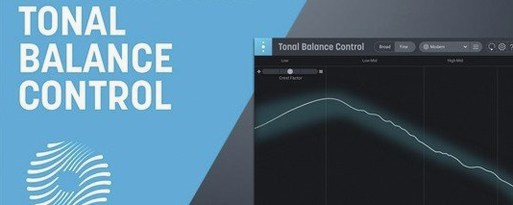
Version 3.0.0 of iZotope Tonal Balance Control, released March 17, 2026, adds a standalone desktop app and extra meters for vocal balance, dynamics, and stereo width. For a newcomer, the quickest way to get useful work done is to follow a short workflow.
Set a target curve from genre references
- Set a target curve. Load Tonal Balance Control on your master bus. From the genre reference curves, pick one that matches your mix style. The plugin will show you where your mix sits relative to that target.
- Look at the new meters. Besides the main tonal balance graph, check the vocal balance, dynamics, and stereo width meters. They give you a second opinion without switching plugins.
- Open a compatible EQ. If you have iZotope Ozone or Neutron, click inside the Tonal Balance Control interface to open their equalizers. Adjust the EQ while watching the tonal balance graph update in real time.
- Use Relay for fine control. The included Relay utility can adjust gain, pan, and stereo imaging on individual tracks. Place Relay on problem channels and tweak until the overall balance improves.
- Try the built-in hybrid EQ. The plugin now includes its own EQ, so you can make corrections without leaving the window.
The meters and controls are responsive, and the whole thing runs on Intel and Apple silicon Macs. If you are new to tonal balance metering, start with one reference curve and a single EQ adjustment per session — you will learn the cause and effect quickly.
Visual frequency check does not replace your ears
People who have not used a tonal balance tool before often wonder whether it replaces their ears. It does not. Tonal Balance Control shows you a visual representation of your mix's frequency distribution compared to a reference curve, but the final decision is always yours. The meters guide you toward a known ballpark, which saves time when you are working in an unfamiliar room or on headphones.
Another common question is whether the plugin works on a single track or only on the master bus. You can put it anywhere, but most users place it on the master bus to see the whole mix. The standalone app does the same thing without needing a DAW open, which is handy for checking a bounced file before you send it out.
Some people ask if the custom reference curve feature requires a perfect audio file. You load any commercial track or previous mix you like, and the plugin builds a curve from it. The curve will only be as useful as the source material — a well-mastered track in a similar genre works best. A poorly recorded demo will give you a curve that may not help much.
Start with the standalone app and a finished mix
Start with the standalone app rather than the plugin. Open it, load a mix you finished recently, and pick a genre curve that fits. Look at where your mix sits in the low end and the high frequencies. That single comparison often tells you more than an hour of soloing tracks.
During the first few sessions, keep the built-in hybrid EQ closed until you have watched the meters for a while. Learn what the vocal balance and stereo width meters look like on a mix you trust before you start making changes. Once you know the baseline, make one small EQ move and see how all the meters respond.
Use Relay on one or two tracks that seem to crowd the low mids. Lower the gain by a decibel or two and check the tonal balance graph again. Small changes add up fast, and Relay lets you make them without opening a full channel strip.
A workflow for matching a mix to a reference
- Load your mix in the standalone app. Open Tonal Balance Control 3.0.0 and point it at your mix file. The app analyzes the whole track and shows the tonal balance graph.
- Load a reference track. Use a professionally mastered song in the same genre. Click to create a custom reference curve from it. The app overlays the two curves so you can see where your mix differs.
- Open the built-in hybrid EQ. With both curves visible, find the frequency area where your mix is significantly above or below the reference. Make a gentle EQ cut or boost in that area. Watch the graph update as you adjust.
- Check the extra meters. After the EQ change, look at the vocal balance and dynamics meters. If the vocal balance shifted too far, back off the EQ move and try a smaller adjustment. The goal is to bring the overall tonal balance closer without pulling the vocals out of place.
- Adjust stereo width with Relay. If the stereo width meter shows a narrow image, insert Relay on the stereo bus or on individual tracks that should have more width. Widen them slightly and check the tonal balance again.
- Export and compare. Bounce the adjusted mix and load it back into the standalone app alongside your original. The graph will show you exactly what changed, and you can decide whether the new version is closer to your reference.
- Initial major release of Tonal Balance Control 3.
- Added standalone desktop app.
- Added extra meters for vocal balance, dynamics, and stereo width.
- Added a built-in hybrid EQ.
- macOS Sonoma 14.7, macOS Sequoia 15.4, or macOS Tahoe 26.1
- Intel or Apple silicon (M-series) Mac
- Interface language: English
Questions from the office
Does Tonal Balance Control 3 work on Apple silicon Macs?
Yes, version 3.0.0 supports both Intel Macs and Apple silicon M-series Macs.
What macOS versions does it require?
The minimum requirements are macOS Sonoma 14.7, macOS Sequoia 15.4, or macOS Tahoe 26.1.
Installation steps
- Use the included installation and activation instructions.
- Install the plugin using the provided instructions.
- Complete activation using the included instructions.
 Questions and replies
Sign in or set up an account to leave a comment.
No one has commented here yet. If you have used this build, the useful note is where it failed.
Same shelf: VST Plugins
All VST Plugins titles iZotope RX
12.1.0 VST Plugins 3.6 GB
 iZotope Neutron
5.2.0 VST Plugins 928 MB
 iZotope Nectar
4.1.0 VST Plugins 545 MB
 iZotope Insight
2.4.0 VST Plugins
 Kalifornia Dynamic KD Alkane
1.0.17 VST Plugins 270 MB
 Komplete Kontrol
3.5.4 VST Plugins 785 MB
 KORG Collection
1.0.3 VST Plugins 175 MB
 KORG TRITON
1.4.7 VST Plugins 586 MB

