
 Download for the office Mac (253 MB)
- Current version
- 1.2.118
- Software maker
- Bogren Digital
- Language support
- English
- License
- K'ed by MORiA
- macOS versions
- macOS 10.13 or later
- Processor type
- Apple Silicon, Intel 64-bit
| System | macOS 10.13 or later |
|---|---|
| Chip | Apple Silicon, Intel 64-bit |
| Download | 253 MB |
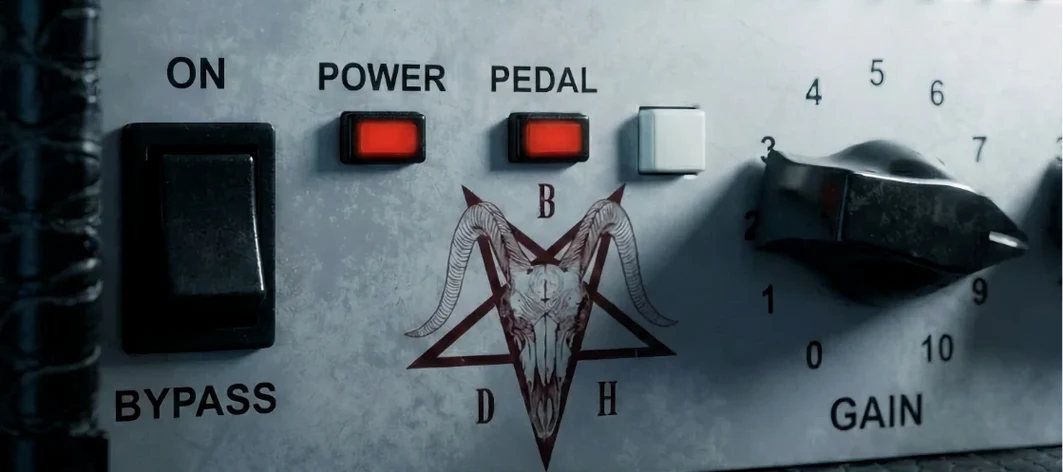
You are tracking a rhythm part that sits too flat in the mix. The 66o6 Plus from Bogren Digital gives you a way to push it forward without opening a wall of menus. This amp simulation focuses on a single main switch that changes the sound character, shifting from tight and restrained to saturated and energetic.
| Detail | Value |
|---|---|
| Plugin type | Guitar amp simulation |
| Version | 1.2.118 |
| Sound basis | Hot-rodded plus version of a late high-gain amp, around 2000 |
| macOS support | 10.13 and later |
It adds density, clarity, and a more defined attack to the guitar sound. The American character and mid-focused clean tone make it useful for cutting through a dense arrangement. Sound-designed by Jens Bogren, it is built to give energy without technical setup. A straightforward control set means you spend time playing, not tweaking.
Sits between stripped-down and full-featured amp sims
If you already use other amp sims, the 66o6 Plus sits in a useful middle ground. Neural DSP's Archetype plugins offer deep signal chains with multiple amps and effects per instance, which is excellent for full production but can overwhelm when you just need one track to cut through. The 66o6 Plus strips that back to a single amp character with one character switch and a pedal switch — less to think about, faster to dial in.
Waves GTR, another established option, provides a full rack of amps and cabinets with detailed controls. It works well for engineers who want to match a specific real-world setup. The 66o6 Plus is different: it gives you one well-tuned sound that you push harder or pull back with that main switch. It does not try to cover every amp type. It focuses on the hot-rodded American high-gain sound from around 2000 and does that one thing well.
IK Multimedia's AmpliTube offers the widest variety of gear models, but the 66o6 Plus is not competing on breadth. It is a quicker tool for guitarists who know they want a mid-focused, energetic tone and do not want to browse through forty amp heads to get there. The pedal switch on the front panel adds a little extra shaping without complicating the layout.
Pedal switch adds drive without leaving the window
The pedal switch on the front panel is worth noting. You can activate it with a click to add another layer of drive or character without reaching for an external plugin. It keeps everything inside the same window.
The main switch that changes the sound character is the real time-saver. Instead of adjusting multiple knobs to shift from a tight rhythm tone to a saturated lead sound, you flip that one switch. It changes the feel of the amp noticeably, but you do not need to remember a specific setting for each song part — the switch does it.
Because the control set is simplified, the plugin loads fast and the interface responds immediately. There are no hidden menus or secondary pages. What you see on the front panel is everything you adjust.
Version 1.2.118 focuses on stability across macOS versions
Version 1.2.118 is the current release. It maintains the same core sound and layout as earlier versions of the 66o6 Plus. The developer has focused on stability and compatibility, ensuring the plugin works reliably on macOS 10.13 through the latest systems, on both Intel and Apple Silicon machines. For everyday use, that means you do not have to worry about the plugin breaking after a system update or when moving a session between an older Intel Mac and a newer M-series machine.
No new controls or sound models were added in this version. The character switch and pedal switch remain the same. The benefit is consistency — if you built a mix around the 66o6 Plus last year, it will sound the same now.
Compare the restrained and saturated switch positions on a rhythm part
Start with the main switch in its restrained position. Record a short rhythm part and listen to how it sits in the mix. Then flip the switch to the saturated position and record the same part. You will hear the difference in density and attack without changing any other settings. This is the fastest way to learn what the plugin does for your playing.
Try the pedal switch on a single note or chord. It adds extra energy, which can help a solo or accent part stand out. Use it sparingly — the pedal switch is most effective when you save it for a specific section rather than leaving it on for the whole song.
Do not boost the input gain before the plugin. The 66o6 Plus is designed to respond to your playing dynamics. If you push a hot signal into it, you lose the range between the tight and saturated modes. Let the plugin see the natural output from your interface or DI box.
Run it on a bus track for parallel processing. Send some of your dry guitar signal to a bus with the 66o6 Plus in saturated mode, then blend it under the main track. This gives you the clarity and defined attack without losing the original tone. It is a trick that works well with this plugin because the mid-focused character cuts through without sounding harsh.
If you are working on a session that was started in another amp sim, try dropping the 66o6 Plus on a duplicate track and compare. You may find it needs less EQ and compression to sit in the mix, which saves time on later processing.
- macOS 10.13 or later
- Intel or Apple Silicon
Installation steps
- Follow the included installation and activation instructions.
- Use the included instructions to complete setup and activation.
 Questions and replies
Sign in or set up an account to leave a comment.
No one has commented here yet. If you have used this build, the useful note is where it failed.
Same shelf: VST Plugins
All VST Plugins titles Blue Cat Audio Blue Cats PatchWork
2.7.5 VST Plugins 587 MB
 Cableguys Snapback
1.1 VST Plugins 37 MB
 Arturia Pigments
7.0.1 VST Plugins 1.8 GB
 Arturia Piano V3
3.3.3 VST Plugins 361 MB
 Arturia Mellotron V
1.9.3 VST Plugins 2.1 GB
 Arturia FX Collection
2026.02 VST Plugins 16.1 GB
 Arturia Emulator II V
1.6.2 VST Plugins 700 MB
 Arturia Efx AMBIENT
1.0.0 VST Plugins 285 MB

