
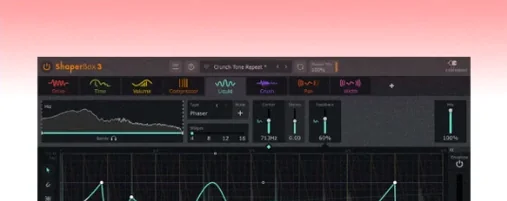
 Download for the office Mac (111 MB)
- Current version
- 3.6.1
- Software maker
- CableGuys
- Language support
- English
- License
- k'ed by Team V.R
- macOS versions
- macOS 10.15 or later
- Processor type
- Apple Silicon, Intel 64-bit
| System | macOS 10.15 or later |
|---|---|
| Chip | Apple Silicon, Intel 64-bit |
| Download | 111 MB |
| Earlier versions | 2 on record |
ShaperBox is a rhythmic multi-effect plugin that lets you shape audio with modular effects in real time.
Shaper modules — each is a separate effect (Volume, Filter, Pan, Width, Crush, Noise, Pitch, and Reverb) that can be chained together in any order.
Audio Trigger — you can sync any Shaper module to the incoming audio's transient, so effects respond to your playing instead of a fixed tempo grid.
Multiband processing — split the signal into low, mid, and high bands and apply different Shaper modules to each band independently.
Sidechain visual display — a real-time waveform overlay shows exactly when the sidechain signal is triggering the effect, making it easier to dial in the timing.
Here's one realistic task: you have a dull synth pad that needs rhythmic movement. Load ShaperBox on its channel, add a VolumeShaper module, and draw a simple 1/8 note pattern. Then add a FilterShaper with a slow sine wave on the cutoff. Enable Audio Trigger on both modules so the pattern restarts with each new chord you play. The pad now breathes in sync with your performance without any manual tempo mapping.
PitchShaper adds three automation parameters
The latest update touches three areas that matter in daily use. First, PitchShaper gets three new automation parameters: Formant Link, Density, and Grain Size. If you automate pitch shifting in a mix, you can now control those three parameters the same way you would control the wet/dry mix or the pitch shift amount. That means more precise changes over time without clicking around inside the plugin.
Second, there was an audio artifact that could appear when a MIDI note or Audio Trigger arrived while the input was silent. Version 3.6.1 fixes that. If you use Audio Trigger with pads or sustained sounds that have quiet gaps, you'll hear cleaner transitions now.
Third, a Logic Pro annoyance went away: the mouse cursor could disappear after dragging a control inside ShaperBox. That's fixed. If you work in Logic and drag parameters often, you'll notice the difference right away.
A workflow: shaping a drum loop with multiband processing
Here's a complete task you can run through in a few minutes. Load a stereo drum loop, insert ShaperBox, and set the multiband split to three bands: low (kick and low toms), mid (snare and hats), high (cymbals and room).
On the low band, add a VolumeShaper module and draw a simple quarter-note gate pattern. The kick hits every beat, so this tightens the low end without losing the groove.
On the mid band, add a FilterShaper module. Set the filter type to band-pass and draw a slow sine wave on the cutoff. The snare will sweep through the frequency range over a bar or two. Enable Audio Trigger on this module so the sweep restarts each time the snare hits.
On the high band, add a PanShaper module. Draw a short ping-pong pattern that moves the cymbals left and right. Set the timing to dotted eighth notes so the movement feels off-kilter against the straight beat.
Each band runs its own Shaper module chain, so the low end stays solid while the mids move and the highs pan. The presets browser has 600 starting points if you want a quick foundation, but building from scratch this way gives you a custom result in under a minute.
How ShaperBox fits with other apps and macOS features
ShaperBox loads as a standard plugin in any DAW that supports VST3, AU, or AAX. It works the same way in Logic Pro, Ableton Live, Cubase, Studio One, or Reaper. The sidechain visual display shows you the incoming signal's waveform, which helps when you route audio from another track into ShaperBox for ducking or triggering.
Because it supports both Apple Silicon and Intel 64-bit systems natively, you can move a session between an M-series Mac and an older Intel Mac without having to swap plugin versions. The plugin uses the standard macOS audio driver stack, so latency and buffer settings stay where your DAW sets them.
The beat-synced timing modes — triplet, straight, dotted, and free — sync to your DAW's transport, so ShaperBox follows tempo changes automatically. If you work in a session that changes tempo mid-song, the effect patterns shift with it. No need to redraw patterns or reset modules.
Trigger multiple Shaper modules from one transient
Audio Trigger can be enabled on any Shaper module, even several at once. That means one transient can start multiple effects simultaneously. On a snare hit, you can have the VolumeShaper gate, the FilterShaper sweep, and the PanShaper move all at the same time, all triggered by the same transient.
The LiquidShaper effect is worth a look if you do flanger or phaser sounds. It's in the module list alongside the more obvious VolumeShaper and FilterShaper, but it's easy to skip if you're focused on rhythmic gating. It gives you modulated comb filtering that can sound like a vintage flanger or a more modern phaser, depending on how you set it.
The 600 presets in the browser are organized by category, so even if you never build a chain from scratch, you can scroll through a few until you hear something close and then tweak it. The presets load fast, which makes them useful for sketching ideas quickly.
- PitchShaper’s Formant Link, Density, and Grain Size are now available as automation parameters.
- Fixed an audio artifact that occurred on silent-input MIDI or Audio Trigger events.
- Fixed a Logic Pro cursor disappearance issue after dragging a control.
- macOS 10.15 or later
- Intel or Apple Silicon processor
- Interface language: English
Questions from the office
Does ShaperBox work on Apple Silicon Macs?
Yes, ShaperBox 3.6.1 supports both Apple Silicon and Intel 64-bit systems on macOS 10.15 and later.
Installation steps
- Open the downloaded disk image.
- Run the standard installation procedure.
- Open the included VR.nfo instruction file for additional setup notes.
 Questions and replies
Sign in or set up an account to leave a comment.
No one has commented here yet. If you have used this build, the useful note is where it failed.
Same shelf: VST Plugins
All VST Plugins titles Serum
2.1.5 VST Plugins 1.2 GB
 Serato Sample
2.2.0 VST Plugins 612 MB
 Serato Hex FX
1.2.0 VST Plugins 105 MB
 Slate Digital Fresh Air
1.0.9 VST Plugins 40 MB
 Slate Digital Murda Melodies
1.1.1 VST Plugins 179 MB
 Scaler 3
3.3.2 VST Plugins 1.4 GB
 Safari Pedals Everything Bundle
2026.05 VST Plugins 628 MB
 Slate Digital Submerge
1.0.5 VST Plugins 38 MB

