
 Download for the office Mac (394 MB)
- Current version
- 1.1.2
- Software maker
- Sound Particles
- Language support
- English
- License
- K'ed by MORiA
- macOS versions
- macOS 10.13 or later
- Processor type
- Apple Silicon, Intel 64-bit
| System | macOS 10.13 or later |
|---|---|
| Chip | Apple Silicon, Intel 64-bit |
| Download | 394 MB |
| Earlier versions | 1 on record |
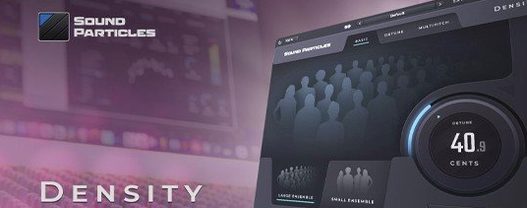
Sound Particles Density is an audio effect plugin that uses granular technology to create layered, complex sounds from a single input signal.
Density — what it does
Density takes your source audio and generates multiple overlapping grains, each at slightly different pitches and positions, to produce a thick, evolving texture. It works on stereo output and supports Dolby Atmos for immersive mixing.
Controls at a glance
Density — how many grains are active at once. Higher numbers give a fuller, more saturated sound. Spread — controls the stereo width of the grain distribution. Pitch — shifts the pitch of individual grains independently, adding harmonic complexity. Size — adjusts the length of each grain, from short stutters to long washes. Mix — blends the dry and wet signals.
System and compatibility
Version 1.1.2 adds compatibility with Pro Tools 2023.6.0 and new Pro Tools track formats, along with general performance improvements and a fix to the pitch shift algorithm. It runs on macOS 10.13 and later, both Apple Silicon and Intel 64-bit.
How Density fits with your other tools
Density works as an insert effect in any AU or AAX-compatible DAW. In Logic Pro, it behaves like any stereo plugin — load it on an audio track or bus and start tweaking. For Pro Tools users, the version 1.1.2 update specifically addressed compatibility with Pro Tools 2023.6.0 and its newer track formats, so you can insert it on stereo auxes, instrument tracks, or even Atmos beds without format mismatches.
Because Density handles Dolby Atmos natively, it fits into an immersive workflow without extra routing. You can insert it on an Atmos bed track inside Pro Tools or Logic and the plugin outputs the correct channel layout. This matters when you're building a surround mix and want a single vocal or instrument to spread across the sound field through granular layering.
Density installs like standard audio software on macOS 10.13 or later
Density is a standard plugin installer, no different from most audio software. The disk image mounts, you run the installer, and point it to your chosen drive — the Applications folder is the recommended location. It needs macOS 10.13 or later, and it runs on both Apple Silicon and Intel 64-bit machines. There is no separate installer for each architecture; the same package works on either.
The interface is in English only, which is typical for specialized audio plugins. If your system language is something else, the controls and labels stay in English. The plugin itself is lightweight in terms of what it requires from your system — it processes audio in real time without needing a separate application or background service running.
Spread at zero gives centered mono-compatible grains
The Density and Spread controls work together in a useful way. If you set Spread to zero, all grains sit at center, which gives you a focused mono-compatible effect even though the plugin processes in stereo. Crank Spread up and the grains scatter across the stereo field. This lets you use Density as a mono-to-stereo widener without additional plugins.
The Size parameter can go from very short grains to long overlapping ones. At short settings, the effect becomes rhythmic and stutter-like, useful for glitch transitions or percussive textures. At longer settings, the grains blend into a smooth pad-like wash that works well for ambient beds or sustained notes.
Because version 1.1.2 fixed an issue in the pitch shift algorithm, the pitch shifting is more reliable now when you push it to extreme settings. If you're layering a single vocal into a choir-like texture, the pitch shifts stay cleaner than in earlier versions.
Start with a mono source and raise Density to thicken the sound
Start with a simple mono source — a voice recording, a single synth note, or a drum loop. Insert Density on the track, leave all controls at default, then slowly raise the Density knob. You will hear the sound thicken as more grains appear. This gives you a feel for how the plugin changes a signal before you start adjusting the other parameters.
Try the sound particles density crack mac search phrase if you run into issues with plugin authorization — but honestly, the installer handles that part cleanly. What matters more is learning how each control interacts. For example, a high Density setting with a short Size creates a dense, grainy texture that can overwhelm a mix. Back off on Size or lower the Mix to blend it in.
Use Density on a send effect rather than an insert. This gives you more control over the dry/wet balance than the Mix knob alone, and you can send multiple tracks to the same Density bus for cohesive layering.
If you work in Dolby Atmos, insert Density on an Atmos bed track and automate the Spread parameter over time. The grains will move across the immersive field, creating movement that feels natural because the plugin handles the channel mapping internally. This works especially well for sound design elements like wind, crowds, or evolving pads.
Keep an eye on the plugin's output level. Density can push the signal louder than the input because it layers multiple grains. Lower the output in your DAW or use the Mix knob to keep your levels consistent. A quick habit: after dialing in a sound, bypass the plugin, check your level, then unbypass and adjust the mix or track fader so the perceived volume stays the same.
- Improved general performance.
- Added compatibility with Pro Tools 2023.6.0.
- Added compatibility with new Pro Tools track formats.
- Fixed an issue in the pitch shift algorithm.
- macOS 10.13 or later
- Apple Silicon or Intel 64-bit
- English interface
Questions from the office
Does Sound Particles Density support Dolby Atmos?
Yes, the plugin supports Dolby Atmos, making it suitable for immersive audio work.
Installation steps
- Mount the downloaded disk image.
- Run the standard installer.
- Choose an installation location. Applications is the recommended destination.
 Questions and replies
Sign in or set up an account to leave a comment.
No one has commented here yet. If you have used this build, the useful note is where it failed.
Same shelf: VST Plugins
All VST Plugins titles Sonic Academy KICK
1.1.8 VST Plugins 358 MB
 Spire
1.5.19 VST Plugins 158 MB
 Slate Digital Submerge
1.0.5 VST Plugins 38 MB
 Steinberg SpectraLayers Pro
13.0.20 VST Plugins 3.9 GB
 Slate Digital Murda Melodies
1.1.1 VST Plugins 179 MB
 Slate Digital Fresh Air
1.0.9 VST Plugins 40 MB
 ShaperBox
3.6.1 VST Plugins 111 MB
 Superior Drummer
3.4.4 VST Plugins 625 MB

