
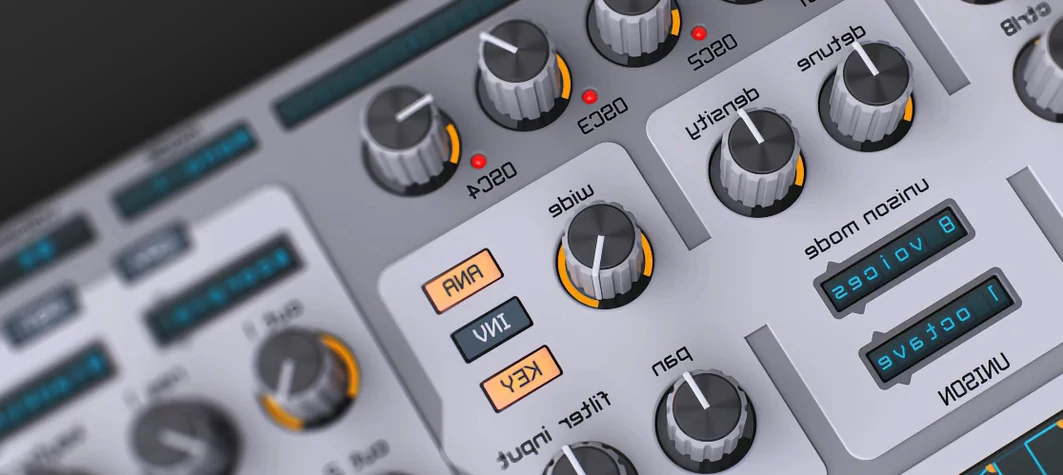
 Download for the office Mac (158 MB)
- Current version
- 1.5.19
- Software maker
- Reveal Sound
- Language support
- English
- License
- K'ed by MORiA
- macOS versions
- macOS 10.13 or later
- Processor type
- Apple Silicon, Intel 64-bit
| System | macOS 10.13 or later |
|---|---|
| Chip | Apple Silicon, Intel 64-bit |
| Download | 158 MB |
| Earlier versions | 1 on record |
The step sequencer in Spire 1.5.19 is where a lot of the motion starts. You can draw in a pattern, assign it to pitch, filter cutoff, or almost anything in the modulation matrix, and let the arpeggiator or sequencer run while you tweak the main synth parameters. The workflow is simple: pick a preset or build a sound from the oscillators, route modulation where you need it, then add effects from the onboard delay, reverb, distortion, phaser, or EQ. The result is a clean, modern sound that sits well in electronic genres like EDM, trance, house, and dubstep.
Spire runs as a VST, AU, or AAX plugin on macOS 10.13 and later, and it works on both Intel and Apple Silicon Macs. Version 1.5.19 (build 5343) was released September 22, 2025. The interface is in English. If you are looking for a virtual synthesizer that covers a wide range of electronic production needs without a lot of fuss, Spire is worth a look.
The modulation grid you might overlook
Spire has a few features that don't get a lot of attention in the marketing materials but make a real difference once you start working with the plugin. The modulation matrix, for instance, is laid out like a simple grid rather than a nested menu system. You pick a source — one of the two LFOs, one of the two ADSR envelopes, or the step sequencer — and a destination. It is direct, and you can see all your routings at once without digging into submenus.
The wavetable oscillator is another detail that is easy to overlook. Spire ships with a selection of wavetables, and you can morph between positions in the table. That means you can start with a basic saw wave and sweep through to something more textured over the course of a note, using an envelope or LFO as the modulation source. It is not a feature you need to use every time, but when you do, it adds movement without needing extra effects.
The arpeggiator and step sequencer are separate, and that matters. The arpeggiator cycles through notes in a chord automatically, which is useful for trance or house leads. The step sequencer lets you draw a rhythm for a parameter, like filter cutoff or pulse width. You can use both at the same time, or just one. The interface keeps them out of the way until you need them, so they don't clutter the main panel.
The preset browser is straightforward. You get more than 1500 factory and user presets. You can categorize by type, or just scroll through. It loads quickly, which is more than you can say for some plugin browsers. You can save your own presets into the user folder, and they show up alongside the factory ones the next time you browse.
EDM, trance, house, and dubstep producers feel at home
Spire is not a one-trick synth. but certain types of users will find more to like than others. Music producers working in EDM, trance, house, and dubstep will feel at home because the sound is clean and modern, and the modulation options are deep enough to create the kind of evolving pads and basslines those genres demand. If you spend a lot of time sound designing, the combination of four oscillators, flexible waveforms, and the multimode filter with 12/24 dB slopes and LP, HP, BP, and notch modes gives you a lot to work with before you even touch the effects section.
Sound designers who like to layer sounds will appreciate the polyphonic nature of Spire. You can play chords, not just single notes, which means you can sketch out a progression and then tweak the sound across all the voices at once. The step sequencer and arpeggiator add rhythmic variation without needing a separate MIDI sequencer.
Producers who work on older Macs or who use both Intel and Apple Silicon machines will appreciate the compatibility. Spire 1.5.19 runs on macOS 10.13 and later, and it supports both architectures. That means you can install it on an older MacBook Pro running High Sierra and on a newer Mac Studio with an M3 chip, and it works the same way in both. The plugin format support — VST, AU, and AAX — means it slots into almost any DAW without extra adapters.
Anyone who has spent time with a synth that buries its modulation options in submenus will appreciate the modulation matrix. It is one of those interface decisions that makes the plugin feel faster to work with, even if you are just making small tweaks.
Building a dubstep bass patch from an empty preset
- Start with an empty preset. Initialize Spire so you have a clean slate. You get a basic saw wave from oscillator one, which is fine for now.
- Turn on oscillator two and set it to a square wave. Tune it an octave below the first oscillator. This gives you a thicker, grittier foundation.
- Turn on oscillator three and set it to a wavetable waveform. Sweep through the wavetable position until you find one with some harmonic movement. Leave oscillator four off for now.
- Route the oscillators to the filter. Set the multimode filter to a low-pass 24 dB slope. You want a closed, aggressive sound.
- Assign LFO 1 to the filter cutoff. Set the LFO rate to something fast, like a sixteenth note, so the filter opens and closes in rhythm. This is the wobble that dubstep bass is known for.
- Add the step sequencer. Draw a pattern that alternates between high and low values. Assign the step sequencer to oscillator three's wavetable position. Now the wavetable sweeps in a rhythmic pattern, adding variation on top of the filter movement.
- Add drive with the distortion effect. Start with a light amount and increase it until the bass sounds saturated. You can use the EQ after the distortion to shape the low end.
- Route the envelope to the amplifier. Use a short decay on the ADSR so each note has a quick attack and a medium release. This keeps the bass punchy and not washed out.
- Play a low C on your MIDI keyboard. Tweak the filter cutoff, LFO rate, and distortion amount until the sound sits where you want it. Save the preset to your user folder.
That workflow uses four oscillators, one filter, one LFO, the step sequencer, distortion, EQ, and one ADSR envelope. You could go deeper by adding reverb or delay on a send, or by layering a second instance of Spire with a different patch.
Works as a plugin in Logic, Ableton, Cubase, and more
Spire works as a plugin inside any DAW that supports VST, AU, or AAX. That includes Logic Pro, Ableton Live, Cubase, Pro Tools, and Reaper. You treat it like any other instrument plugin: insert it on a MIDI track, play notes from your keyboard or draw them in the piano roll, and route the audio output to your mixer.
On macOS, Spire can run alongside other Reveal Sound plugins or third-party synths in the same project. Because it uses standard plugin formats, your DAW handles plugin management, presets, and automation. You can automate almost any parameter in Spire from your DAW's automation lanes, which is useful for drawing in filter sweeps or LFO rate changes over time.
The macOS Audio MIDI Setup utility is not something you will need for Spire. It is a plugin, so it uses your DAW's audio engine and your interface's drivers. That said, if you use Apple's internal audio system for quick ideas, Spire will output through whatever your DAW sends to. No extra setup is required.
Spire mac offers versatile synthesizer capabilities ideal for electronic music producers. It is stable, it is compatible with both Intel and Apple Silicon Macs, and the step sequencer and modulation matrix give it a workflow that feels modern without being complicated. The clean sound and flexible modulation make it a solid choice for electronic music production on macOS.
- Build 5343 for version 1.5.19.
- macOS 10.13 or later
- Intel or Apple Silicon
Installation steps
- Use the included installation instructions.
- Use the included activation instructions.
 Questions and replies
Sign in or set up an account to leave a comment.
No one has commented here yet. If you have used this build, the useful note is where it failed.
Same shelf: VST Plugins
All VST Plugins titles Steinberg SpectraLayers Pro
13.0.20 VST Plugins 3.9 GB
 Sound Particles Density
1.1.2 VST Plugins 394 MB
 Sonic Academy KICK
1.1.8 VST Plugins 358 MB
 Slate Digital Submerge
1.0.5 VST Plugins 38 MB
 Slate Digital Murda Melodies
1.1.1 VST Plugins 179 MB
 Slate Digital Fresh Air
1.0.9 VST Plugins 40 MB
 Superior Drummer
3.4.4 VST Plugins 625 MB
 Supertone Air
1.0.1 VST Plugins 408 MB

