
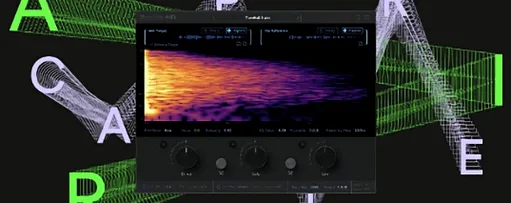
 Download for the office Mac (408 MB)
- Current version
- 1.0.1 [GUISEPPE]
- Software maker
- Supertone
- Language support
- English
- License
- K'ed by MORiA
- macOS versions
- macOS 10.13 or later
- Processor type
- Apple Silicon, Intel 64-bit
| System | macOS 10.13 or later |
|---|---|
| Chip | Apple Silicon, Intel 64-bit |
| Download | 408 MB |
The Air feature in Supertone Air lets you capture a space’s acoustic signature and apply it to dialogue. It’s a practical tool for ADR workflows where matching location sound matters.
Workflow in four steps
- Load Supertone Air as an AudioSuite insert in Pro Tools (or as a regular AU/VST3/AAX plug-in in another DAW).
- Use the capture function to analyze a segment of reference dialogue—the plug-in builds an Air profile from the room’s reverb and EQ.
- Save the profile as a file you can share with other sessions or collaborators.
- Apply the profile to the ADR take. The plug-in processes offline, so you render the result before playback.
The neural network behind Acoustic Scene Transfer does the heavy lifting, but the workflow stays straightforward: capture, save, match. It supports 44.1, 48, and 96 kHz sample rates, and runs natively on Apple Silicon or Intel Macs running macOS 10.13 or later. The current version (1.0.1) fixes a naming conflict with an older Sound Particles plug-in and renames the file to Supertone Air.
Clean reference needed for capture function
A few things tend to trip people up when they first run Supertone Air. The capture function needs a clean segment of reference dialogue — if the source has background music, heavy noise, or more than one speaker, the profile picks up that clutter too. Pick a section where only the actor’s voice is audible, ideally a phrase with a bit of space before and after.
Another one: the plug-in works offline. That means you select your audio region, open the plug-in, adjust settings, and then render. If you don’t render before playback, you won’t hear the match. In Pro Tools AudioSuite, the commit or render button is your last step. In other DAWs running the AU or VST3 version, the same principle applies — process, then listen.
If the matched dialogue sounds hollow or overly colored, check the reverb controls for decay, damping, and proximity. The direct, early, and late reflection sliders let you dial back how much of the captured space comes through. Sometimes a profile captures more room than you need; reducing the late reflections alone can clean things up.
Finally, if the plug-in doesn’t show up after installation, verify you installed the correct format (AAX, VST3, or AU) for your DAW. The 1.0.1 update fixed an install conflict with Sound Particles Air, so if you have that older plug-in, update Supertone Air to avoid file-name clashes.
A full workflow: matching a single ADR line
Say you have a production track from a noisy coffee shop and an ADR line recorded in a dead booth. Here’s how you’d run it through Supertone Air from start to finish.
- In Pro Tools, find the production dialogue region with the room tone you want to match. Make a short selection — three to five seconds of clean speech is enough.
- Insert Supertone Air on the AudioSuite menu. Click the capture button to analyze the selected region. The plug-in builds an Air profile from the reverb and EQ of that space.
- Save the profile using the export function. Name it something like “CoffeeShop_Room.” You can also export the captured space as a WAV file if you want to audition it later.
- Select the ADR region in the timeline. With Supertone Air still open, load the saved profile. The plug-in applies the acoustic signature to the dry recording.
- Adjust the reverb controls — start with decay and damping, then fine-tune direct, early, and late reflections to match the original. Tweak the EQ matching if the ADR still sounds too bright or dull.
- Render the processed region. Play it back against the original production track. If it still doesn’t sit right, adjust the profile settings and render again.
The whole process takes a few minutes once you’re familiar with the controls. The neural network handles the heavy matching, but your ear still decides the final blend.
Runs on any Mac from macOS 10.13 and supports common session rates
Supertone Air runs on any Mac with macOS 10.13 or later, whether it’s an Intel model or Apple Silicon. It supports 44.1, 48, and 96 kHz sample rates, so it covers the common session rates for post-production. The plug-in is available in AAX for Pro Tools AudioSuite, VST3 for most other DAWs, and AU for Logic Pro and similar hosts.
Because it processes offline, you won’t see real-time CPU usage while you tweak settings — the heavy computation happens when you render. That means you can run it on older Intel Macs without worrying about dropouts, as long as you’re patient during the render step.
Direct competitor to iZotope Dialogue Match and Acon Digital ERA Reverb Remover
Supertone Air competes directly with iZotope Dialogue Match and Accusonus ERA Reverb Remover (now part of the Acon Digital suite). Dialogue Match offers a similar capture-and-apply workflow with EQ and reverb matching, but it leans more on its own analysis tools and can be heavier on system resources. Accusonus’s ERA Reverb Remover focuses on reducing reverb rather than matching a specific space, so it’s better for cleaning up dialogue than for ADR work.
Supertone Air’s advantage is its dedicated reverb controls for direct, early, and late reflections — you get finer control over how much of the captured room bleeds through. The ability to export Air profiles and WAV files also makes it easier to share spaces across sessions or with other editors. For straight ADR matching, it’s a focused tool without the extra modules you’d get in Dialogue Match.
- The plug-in file name changed from Air to Supertone Air.
- Fixed an installation issue that occurred when Sound Particles Air was already installed.
- macOS 10.13 or later
- Apple Silicon or Intel processor
- 44.1 kHz, 48 kHz, or 96 kHz sample rate support
- AAX, VST3, or AU host
Questions from the office
Can I use Supertone Air in real time, or is it only for offline processing?
It works as a standard AU, VST3, or AAX plug-in in any DAW, but it’s optimized for offline processing in Pro Tools AudioSuite, which means you render the effect rather than hearing it live.
Installation steps
- Follow the included installation and activation instructions.
 Questions and replies
Sign in or set up an account to leave a comment.
No one has commented here yet. If you have used this build, the useful note is where it failed.
Same shelf: VST Plugins
All VST Plugins titles Superior Drummer
3.4.4 VST Plugins 625 MB
 Synapse Audio The Legend HZ v2.0.2.R1
2.1 VST Plugins 472 MB
 T-RackS
6.3.2 VST Plugins 2.3 GB
 Steinberg SpectraLayers Pro
13.0.20 VST Plugins 3.9 GB
 Spire
1.5.19 VST Plugins 158 MB
 Sound Particles Density
1.1.2 VST Plugins 394 MB
 Sonic Academy KICK
1.1.8 VST Plugins 358 MB
 Slate Digital Submerge
1.0.5 VST Plugins 38 MB

