
 Download for the office Mac (472 MB)
- Current version
- 2.1
- Software maker
- Synapse Audio
- Language support
- English
- License
- k'ed by GUISEPPE
- macOS versions
- macOS 10.14 or later
- Processor type
- Apple Silicon, Intel 64-bit
| System | macOS 10.14 or later |
|---|---|
| Chip | Apple Silicon, Intel 64-bit |
| Download | 472 MB |
| Earlier versions | 1 on record |
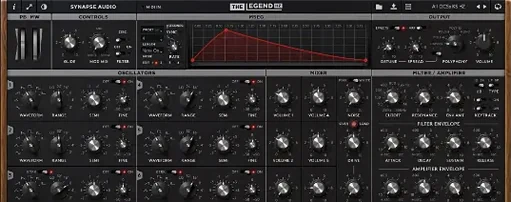
Producers and sound designers working on film scores, electronic music, or dense mixes reach for The Legend HZ when they need that thick, aggressive analog tone. It is the successor to The Legend, built around six VA oscillators and a 914 Fixed Filter Bank — the same hardware that gave classic sci-fi and horror soundtracks their weight.
Stack and detune voices for a massive low end
The oscillator section lets you stack and detune voices for a massive low end that cuts through without mud. The filter bank carves specific frequency bands, so you can push a lead forward or tuck a pad behind a vocal. Version 2.1 adds a paragraphic equalizer on the back panel and compressor saturation, giving you two more ways to shape the tone inside the plugin rather than reaching for extra channel strips. MPE support means each note can bend pitch, filter, and volume independently — useful for expressive, evolving parts.
Patches and compatibility
Patches made for the original The Legend load straight into The Legend HZ. It ships with 200 factory presets (50 new in 2.1 by Kevin Schroeder), supports Native Kontrol Standard, and runs in VST, AAX, and Audio Unit hosts on both Apple Silicon and Intel Macs. The interface is English only.
These new features in version 2.1 change the way you work with The Legend HZ during a session. The paragraphic equalizer on the back panel means you can fix a resonance or tame a low-mid buildup right inside the plugin, without adding a separate EQ on the track. The compressor saturation adds warmth and glue, especially useful when you want a bass patch to sit consistently across a long cue. MTS-ESP microtuning support opens up alternate scales and tunings, which is a big deal for sound designers working on experimental projects or anything that needs to avoid standard equal temperament.
Paragraphic equalizer moved to the back panel
- The paragraphic equalizer is on the back panel, not the front. It has several bands you can adjust to notch out problem frequencies or shape the overall tone. Once you set it, it stays out of the way until you need it again.
- Compressor saturation is also on the back panel. It adds a gentle or aggressive saturation stage after the compressor, depending on how hard you drive it. This saves you from adding a separate saturation plugin on the channel.
- MTS-ESP support lets you load microtuning files for non-standard scales. If you work with a MIDI controller that supports MTS-ESP, the plugin follows those tuning changes automatically.
- 50 new presets from Kevin Schroeder give you more starting points, particularly for modern cinematic sounds and electronic textures.
Real-world scenario: a film composer scoring a tense scene
Consider a composer working on a cue for a thriller. They need a bass line that stays low and rumbling without interfering with dialogue and footsteps. With the 914 Fixed Filter Bank, they can cut everything below 60 Hz and notch out the 200 Hz area where the actor's voice sits. The paragraphic equalizer lets them further tame a 400 Hz buildup that was making the bass sound boxy. The compressor saturation rounds off the transient attack so the bass line pulses rather than thumps. The whole chain stays inside The Legend HZ — no need to bounce, route, or add extra plugins. The MPE support means they can assign aftertouch to open the filter slightly during the climax, adding tension without a separate automation lane.
Adjust the back panel equalizer to fit your mix
When you open a fresh instance of The Legend HZ, the default patch might not fit your mix right away. Here are the settings I adjust first to get better results faster:
- Check the back panel equalizer. Even if you plan to use external EQ later, set a gentle high-pass filter on the first band to remove subsonic rumble. This cleans up the low end before it hits any compression.
- Adjust the compressor saturation. Start with the drive low and listen for when the sound thickens without losing clarity. For aggressive leads, increase the drive until you hear slight distortion, then back off a bit.
- Explore the MTS-ESP settings if you use alternate tunings. Load a tuning file from your collection and audition a few presets to hear how the filter responds to the new intervals. Some patches reveal unexpected harmonics in non-standard scales.
- Browse the 50 new presets by Kevin Schroeder. They are designed to show off the updated features, so they make good starting points for custom patches. Listen to how the paragraphic EQ is used in each one to learn what settings work in different contexts.
These adjustments take a few minutes but save time later because you are shaping the sound inside the plugin rather than stacking extra effects on the mixer. The Legend HZ remains a deep instrument for serious production work, and the 2.1 updates make it more self-contained for mixing and sound design.
- Added a paragraphic equalizer on the back panel.
- Added compressor saturation.
- Added MTS-ESP microtuning support.
- Added 50 factory presets by Kevin Schroeder.
- macOS 10.14 or later
- Apple Silicon or Intel 64-bit
Questions from the office
Can I use presets from the original The Legend in The Legend HZ?
Yes. Patches and soundbanks created for The Legend can be loaded directly into The Legend HZ.
Does The Legend HZ work on Apple Silicon Macs?
Yes. It supports both Apple Silicon and Intel 64-bit systems.
Installation steps
- Follow the included installation instructions.
- Follow the included activation instructions.
 Questions and replies
Sign in or set up an account to leave a comment.
No one has commented here yet. If you have used this build, the useful note is where it failed.
Same shelf: VST Plugins
All VST Plugins titles T-RackS
6.3.2 VST Plugins 2.3 GB
 Supertone Air
1.0.1 VST Plugins 408 MB
 Superior Drummer
3.4.4 VST Plugins 625 MB
 Steinberg SpectraLayers Pro
13.0.20 VST Plugins 3.9 GB
 Spire
1.5.19 VST Plugins 158 MB
 Sound Particles Density
1.1.2 VST Plugins 394 MB
 Sonic Academy KICK
1.1.8 VST Plugins 358 MB
 Tone Empire EDYN
1.0.2 VST Plugins 198 MB

