
 Download for the office Mac (198 MB)
- Current version
- 1.0.2
- Software maker
- Tone Empire
- Language support
- English
- License
- K'ed by MORiA
- macOS versions
- macOS 10.14 or later
- Processor type
- Apple Silicon, Intel 64-bit
| System | macOS 10.14 or later |
|---|---|
| Chip | Apple Silicon, Intel 64-bit |
| Download | 198 MB |
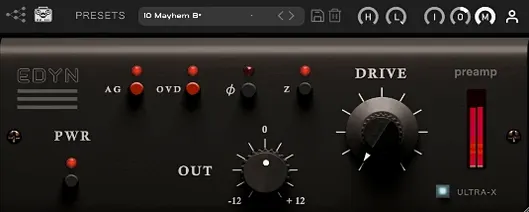
You've got a vocal track that sounds flat or a drum bus that lacks punch. Pull up Tone Empire EDYN, dial in some Drive, and the signal gets that discrete transistor preamp character: a bright midrange, fast transients, and a deep low end. It's not subtle, but it doesn't have to be.
Runs on macOS 10.14 and later, Intel and Apple Silicon
EDYN runs on macOS 10.14 and later, on both Intel and Apple Silicon Macs. Version 1.0.2 is optimized for Apple Silicon and reduces CPU load noticeably. The plugin comes as AU, VST3, and AAX, so it works in Logic Pro, Pro Tools, Ableton Live, Cubase, and most other hosts. The interface language is English.
The sound and how it works
The Drive module controls saturation, adding warmth and density without turning everything to mush. There's also a phase inversion switch, useful when you blend the preamp with the original signal. Tone Empire calls it EDYN Pre, and it's designed to recreate the sound of an old American console. Recent bug fixes sorted out crashes with multiple instances in Logic Pro, offline rendering on the master output, and parameter automation in Pro Tools.
Mix control blends saturated and dry signals
The Mix control for parallel processing is one of those features you might overlook at first. It lets you blend the saturated, preamp-colored signal with the dry original, so you can dial in exactly how much of that vintage console character you want without committing to full saturation. The input and output level controls are straightforward, but they work together with the Drive module to give you fine control over gain staging. If you push the input harder and back off the output, you get more drive and harmonic content without clipping the next plugin in your chain.
The switchable input impedance — 50 ohms or 200 ohms — changes how the plugin reacts to the incoming signal. It's a detail that mimics how a real console preamp loads the source, and it can subtly shift the tone and transient response. Beginners often skip this setting, but swapping between the two values can make a noticeable difference on a DI guitar or a synth line. The high-pass and low-pass filters are also easy to ignore, but they let you shape the frequency range that hits the saturation stage, which can keep low-end rumble or harsh highs from overdriving the Drive module.
The automatic gain compensation is another convenience. When you increase the Drive, the plugin adjusts the output level to keep your perceived loudness consistent, so you're not fooled by volume changes when comparing the processed sound to the dry signal. That makes A/B comparisons more honest.
Cranking Drive too high causes muddiness
A common error is cranking the Drive too high on everything. The saturation can sound great on a snare or a vocal, but on a full mix bus it can quickly turn muddy or harsh. Start with the Drive low, maybe at 25 percent, and use the Mix control to blend it in. Another mistake is ignoring the phase inversion switch. If you're using EDYN in parallel with the original track, having the phase wrong can cancel out low-end punch or make the track sound thin. Flip it and listen.
Some users forget to check the input impedance setting. Leaving it at 200 ohms by default works fine for most sources, but on a DI bass or a vintage synth, switching to 50 ohms can tighten the low end and change how the saturation behaves. It's worth trying both. Also, the OVD overdrive mode is easy to overlook entirely. It adds a different flavor of distortion, more aggressive than the standard Drive, and it's useful on electric guitars or aggressive synth basses, not just for subtle warmth.
Fixes for offline rendering and AU validation
The bug fixes in 1.0.2 directly address problems that users ran into regularly. Offline rendering on the master output would sometimes fail, leaving a silent bounce or a corrupted file. That's fixed now. AU validation issues in Logic Pro on macOS Sequoia meant the plugin might not show up in the plugin manager or could fail to load. That's resolved too. If you use multiple instances of EDYN in a Logic session, the crashes that used to happen are gone. And parameter automation in Pro Tools — something mixing engineers rely on — now works without glitches.
Beyond bug fixes, the Apple Silicon optimization reduces CPU load, which matters if you're running several instances across a session. The scalable interface also improves support for high-resolution displays, so on a Retina or 4K monitor, the plugin doesn't look tiny or blurry. The visual quality matches the sound quality now.
Applying EDYN to a dull rock drum bus
Say you're mixing a rock track and the drum bus sounds clean but flat. You insert EDYN on the drum bus, set the input impedance to 50 ohms, and dial in a moderate amount of Drive — maybe 40 percent. The snare gets that bright, punchy transient, and the kick drum gains depth without losing clarity. You use the Mix control to blend it to about 60 percent wet, so the original attack stays intact. Then you flip the phase inversion switch to check: you hear the low end tighten up, so you leave it inverted. The high-pass filter at 80 Hz keeps the sub frequencies from overloading the saturation, and the low-pass filter at 12 kHz tames any harsh cymbal overtones. The result is a drum bus that sounds bigger and more present without being distorted. A mixing engineer who needs to add character to a sterile mix will get the most out of EDYN by using these controls together, not just the Drive knob.
- Bug fixes for offline rendering on the master output.
- AU validation fixes in Logic Pro on macOS Sequoia.
- Crash fixes for multiple instances in Logic Pro.
- Parameter automation fixes in Pro Tools.
- Apple Silicon performance optimization and reduced CPU load.
- Improved support for high-resolution displays with a scalable interface.
- macOS 10.14 or later
- Intel or Apple Silicon
- Host that supports AU, VST3, or AAX
Questions from the office
Does EDYN work on Apple Silicon Macs?
Yes, version 1.0.2 is optimized for Apple Silicon and also supports Intel 64-bit systems.
What hosts is EDYN compatible with?
It comes in AU, VST3, and AAX formats, so it works in Logic Pro, Pro Tools, Ableton Live, Cubase, and other major DAWs.
Installation steps
- Download the package and extract the files.
- Install and activation instructions are included with the package.
 Questions and replies
Sign in or set up an account to leave a comment.
No one has commented here yet. If you have used this build, the useful note is where it failed.
Same shelf: VST Plugins
All VST Plugins titles Toontrack EZkeys
2.1.5 VST Plugins 707 MB
 UJAM Beatmaker VICE
2.4.0 VST Plugins 262 MB
 UJAM Symphonic Elements STRIIIINGS
1.3.1 VST Plugins 4.4 GB
 T-RackS
6.3.2 VST Plugins 2.3 GB
 Valhalla DSP Bundle
2025.12 VST Plugins 61 MB
 Synapse Audio The Legend HZ v2.0.2.R1
2.1 VST Plugins 472 MB
 Supertone Air
1.0.1 VST Plugins 408 MB
 Superior Drummer
3.4.4 VST Plugins 625 MB

