
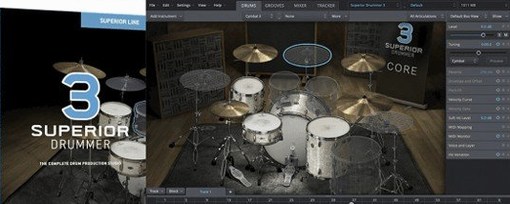
 Download for the office Mac (625 MB)
- Current version
- 3.4.4
- Software maker
- Toontrack
- Language support
- English
- License
- k'ed by Team V.R
- macOS versions
- macOS 10.13 or later
- Processor type
- Apple Silicon, Intel 64-bit
| System | macOS 10.13 or later |
|---|---|
| Chip | Apple Silicon, Intel 64-bit |
| Download | 625 MB |
| Earlier versions | 4 on record |
Version 3.4.4 of Superior Drummer is out now. If you're on an earlier build, note that 3.4.0 is required for support of Superior Drummer 3 products released from Q2 2025 onward. This is a maintenance release — no new sounds, but it keeps the plugin compatible with the latest content packs.
230 GB of drum samples across kits and genres
- 230 GB of drum samples across multiple kits and genres.
- Audio-to-MIDI conversion for turning live drum recordings into editable MIDI patterns.
- Percussive sound design tools for shaping and layering hits.
- Bridges acoustic and electronic drum production in one virtual environment.
Runs natively on Intel and Apple Silicon Macs
Superior Drummer 3.4.4 requires macOS 10.13 or later and a 64-bit host. It runs natively on both Intel and Apple Silicon Macs — no Rosetta needed on M-series machines. The interface is English only. The download comes as a disk image; open it and run the standard installer.
Adjust preferences inside the plugin before loading kits
Before you start loading kits and mapping MIDI, a few settings make the difference between a default setup and one that matches how you actually work. Superior Drummer 3 keeps its preferences inside the plugin, not in a separate config app, so everything is in one place once you open it in your host.
- Audio routing. The built-in mixer routes each drum channel to separate outputs by default. If your DAW handles multitrack audio well, leave it. If you prefer a stereo submix, switch the output configuration to a single stereo pair before you load a kit. Changing it later loses any mixer tweaks you made.
- MIDI note map. The default mapping follows the General MIDI standard for drums, which most DAW drum maps expect. If you already have a custom mapping from another sampler or a hardware e-drum kit, load it here. You can also remap individual pieces without affecting the whole kit.
- Audio-to-MIDI threshold. The conversion engine has a sensitivity control that determines how quiet a hit it will detect. Start with the default; if you get extra ghost notes, raise it. If you lose soft hi-hat taps, lower it. This is per-file, not a global preference, so you can dial it in fresh for each recording.
- Buffer and latency. This is a host-side setting, not inside Superior Drummer, but the plugin tells you the current buffer size in its status bar. If you are programming drums from a keyboard or pads and feel a delay, drop your host buffer. For mixing, raise it again to free up CPU for effects.
Drag and drop MIDI from the groove library
These are not hidden features. They are simply the kind of thing you might overlook when you are busy auditioning kits and building a groove.
- Drag and drop MIDI. You can drag a pattern from the built-in groove library directly onto a DAW track. The groove library is part of the content that ships with the 230 GB sample set, so there are ready-made patterns for each kit. Dragging them out gives you a starting point you can edit note by note.
- Mixer presets. The built-in mixer includes 35 effects, and you can save the whole mixer state as a preset. If you spend time dialing in a room sound or compression chain for a particular genre, save it. That way, when you switch to a different kit, you can recall the same processing without starting over.
- Kit piece muting and soloing. Each drum in the mixer has a mute and solo button. This is not unusual in itself, but it is worth remembering when you are sound designing. Mute the kick and snare, then solo the overheads to hear what the room mics are picking up. It helps you decide whether to keep the natural ambience or replace it with reverb.
- The tap tempo function. If you are building a drum track from scratch and do not know the exact BPM, tap along with the song on a MIDI key. Superior Drummer detects the tempo and adjusts the grid. You can then quantize your hits to that grid or use it as a guide for editing.
A mix engineer fixes cymbal bleed with audio-to-MIDI
A friend who mixes in-the-box for a local rock band sent me recorded drum stems from a live session. The kick and snare sounded fine, but the overheads had too much cymbal bleed and not enough room. He loaded Superior Drummer 3, set up a stereo track, and used the audio-to-MIDI conversion on the overhead recording. The plugin turned the cymbal hits into MIDI notes, which he then mapped to a ride and crash from one of the 7 included kits. He kept the original kick and snare audio, replaced the overheads entirely with virtual mics on the new cymbal sounds, and ran the whole thing through one of the mixer's built-in compressors. The result was a drum sound that sat in the mix without the bleed problems. He did not touch a single sample outside of what ships with the plugin. This is not a typical workflow for everyone, but it shows how the audio-to-MIDI conversion can solve a specific, real problem.
64-bit plugin for macOS 10.13 or later on any recent Mac
Superior Drummer 3.4.4 is a 64-bit plugin that runs on macOS 10.13 or later. It supports both Intel and Apple Silicon architectures, so it will load in any current DAW on any recent Mac without an emulation layer. The installer comes as a disk image, which you open and run through the standard step-by-step process. There is no separate background service or license manager to install alongside it. The plugin loads its samples from the content library, which is separate from the application itself. The 230 GB of samples live on your drive, not inside the plugin binary. That means you need enough free space for the library, but the plugin itself is a much smaller install. Once the library is on disk, Superior Drummer references it on launch. There is no streaming from the internet and no online check at startup. The interface is English only, with no localization options in this version.
- Version 3.4.4 is the current release.
- Version 3.4.0 is required for support of Superior Drummer 3 products released from Q2 2025 onward.
- macOS 10.13 or later
- 64-bit host support required
- Intel and Apple Silicon (ARM) supported
- Interface language: English
Questions from the office
Can Superior Drummer convert audio to MIDI?
Yes, the software includes a feature that converts drum audio into editable MIDI patterns.
Installation steps
- Open the downloaded disk image.
- Run the standard installer in sequence.
 Questions and replies
Sign in or set up an account to leave a comment.
No one has commented here yet. If you have used this build, the useful note is where it failed.
Same shelf: VST Plugins
All VST Plugins titles Supertone Air
1.0.1 VST Plugins 408 MB
 Synapse Audio The Legend HZ v2.0.2.R1
2.1 VST Plugins 472 MB
 T-RackS
6.3.2 VST Plugins 2.3 GB
 Steinberg SpectraLayers Pro
13.0.20 VST Plugins 3.9 GB
 Spire
1.5.19 VST Plugins 158 MB
 Sound Particles Density
1.1.2 VST Plugins 394 MB
 Sonic Academy KICK
1.1.8 VST Plugins 358 MB
 Slate Digital Submerge
1.0.5 VST Plugins 38 MB

