
 Download for the office Mac (315 MB)
- Current version
- 1.5.1 (6566)
- Software maker
- Arturia
- Language support
- English
- License
- K'ed by MORiA
- macOS versions
- macOS 10.13 or later
- Processor type
- Apple Silicon, Intel 64-bit
| System | macOS 10.13 or later |
|---|---|
| Chip | Apple Silicon, Intel 64-bit |
| Download | 315 MB |
| Earlier versions | 3 on record |
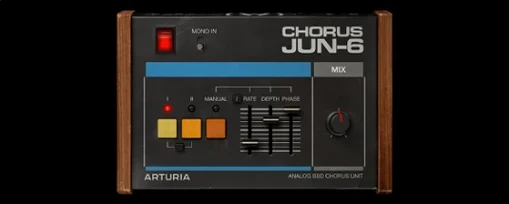
When you need that thick, three-voice chorus that defined countless 80s records, the Arturia Chorus JUN-6 puts a faithful BBD analog warmth right inside your DAW. It runs as a 64-bit effect plugin on both Intel and Apple Silicon Macs, so it fits into most modern setups without fuss.
Native ARM and x86 with 64-bit format
| Item | Detail |
|---|---|
| Version | 1.5.1 (6566) |
| Architecture | ARM and x86 |
| macOS | 10.13 and later |
| Format | 64-bit plugin |
Sound and controls
The plugin keeps the authentic 3-mode layout of the original Juno chorus, so you get the classic I, II, and I+II options. On top of that, Arturia added flexible modern controls for shaping the modulation to your taste. It is a practical way to bring that recognizable chorus character to any track without hunting for vintage hardware.
Learn controls on a simple mono part before mixing
Once you have the plugin installed and activated, give yourself a few minutes to get familiar with the controls before you put it on a real mix. Open a session with a simple mono part — a pad, a guitar, or a vocal — and cycle through the three modes. Mode I is subtle, Mode II is wider, and Mode I+II layers both for a full, animated effect. Listen to how each one changes the stereo image. The modern controls let you dial back the intensity or adjust the rate and depth if the default settings feel too strong for your track.
I recommend starting with the plugin on an aux send rather than an insert. That way you can blend the dry signal and the effected signal independently, which gives you more control over how much chorus you actually hear. It is an old mixing trick that works especially well with this type of effect.
Building a stereo pad from a mono source
A common task in music production is turning a dull mono sound into something wide and moving. Here is a straightforward workflow using the Arturia Chorus JUN-6.
Start with a mono synth pad or a clean electric guitar part. Route it to a stereo aux track and insert the plugin there. Set the mode to I+II — that gives you both chorus voices at once, which creates a natural stereo spread. Adjust the modern rate control so the movement is slow enough not to fight the tempo of your song, usually around 0.3 Hz to 0.5 Hz. Then set the depth to about 60 percent. The sound will begin to open up and shift across the stereo field without losing its center.
If the effect feels too thick, pull the mix knob on the plugin back to around 50 percent. This blends some of the dry signal back in and keeps the part from becoming washed out. For a more pronounced effect on a bridge or breakdown, automate the mix knob to push the chorus deeper during those sections. The whole process takes about two minutes once you know the controls.
Authentic 1980s grit and warmth for a film soundtrack
A sound designer I know was putting together a soundtrack for a short film set in the early 1980s. He needed a chorus that sounded authentic — not a modern, clean stereo widener but something with the grit and warmth of the original hardware. He had tried a few other plugins, but they either sounded too pristine or they colored the sound in ways that did not fit the period.
He loaded the Arturia Chorus JUN-6 onto a mono analog synth line that served as the main theme. Mode II gave the part a gentle, swimming character that sat well behind the dialogue. The BBD analog warmth added just enough grain to make it sound like it came from a tape machine. He ended up using it on three more tracks in the same project: a plucked bass, a pad, and a reverb return. No extra EQ or compression was needed to make them sit together.
Free TAL-Chorus-LX vs Arturia's Juno emulation
If you are shopping for a chorus plugin for Mac, you have options. Here is how the Arturia Chorus JUN-6 compares with two others that producers often reach for.
TAL-Chorus-LX is a free plugin that also emulates the Juno chorus. The difference is in the modern controls. Arturia gives you extra parameters for shaping the modulation, which means you can tailor the effect more precisely. The TAL version is simpler and gets you close, but you have less room to fine-tune the sound.
Waves Mondo Mod is a modulation plugin that does chorus, flange, and phaser. It is versatile, but it does not aim for the specific Juno character. The Arturia Chorus JUN-6 is focused on one sound and does it well. If you need exactly that 80s polysynth chorus, the Arturia plugin gets you there faster because you are not hunting through presets or tweaking parameters to match a reference.
Both alternatives have their place. The Arturia Chorus JUN-6 sits in the middle: more control than the free option, more focused than the Swiss-army-knife modulation plugin. For anyone who wants the Juno chorus sound with modern flexibility, it is a solid choice.
- macOS 10.13 or later
- 64-bit plugin host
- Apple Silicon or Intel processor
Questions from the office
Does Arturia Chorus JUN-6 work on Apple Silicon Macs?
Yes, it supports both ARM and x86 architectures, so it runs natively on Apple Silicon and Intel Macs.
Installation steps
- Install the software.
- Follow the included instructions for installation and activation.
 Questions and replies
Sign in or set up an account to leave a comment.
No one has commented here yet. If you have used this build, the useful note is where it failed.
Same shelf: VST Plugins
All VST Plugins titles Arturia Analog Lab V Updated
5.12.6 VST Plugins 2 GB
 Arturia Efx AMBIENT
1.0.0 VST Plugins 285 MB
 Arturia Emulator II V
1.6.2 VST Plugins 700 MB
 Arturia FX Collection
2026.02 VST Plugins 16.1 GB
 Arturia Mellotron V
1.9.3 VST Plugins 2.1 GB
 Arturia Piano V3
3.3.3 VST Plugins 361 MB
 Arturia Pigments
7.0.1 VST Plugins 1.8 GB
 Ample Sound Ample Guitar LP III
4.0.1 VST Plugins 9.2 GB

