
 Download for the office Mac (14.5 GB)
- Current version
- 2.9.1
- Software maker
- XLN Audio
- Language support
- English
- License
- K'ed by TEAM HCiSO
- macOS versions
- macOS 10.13 or later
- Processor type
- Apple Silicon, Intel 64-bit
| System | macOS 10.13 or later |
|---|---|
| Chip | Apple Silicon, Intel 64-bit |
| Download | 14.5 GB |
| Earlier versions | 2 on record |
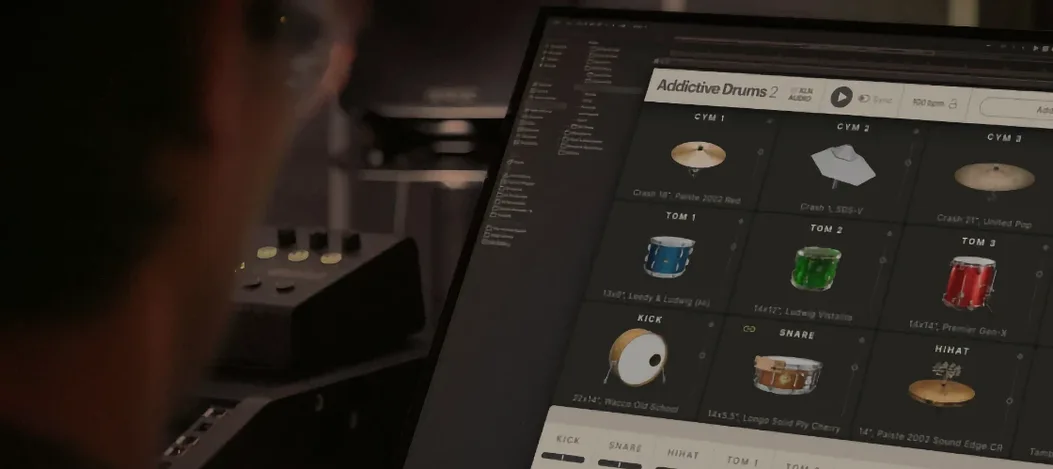
Drummers, producers, and home studio folks who need reliable drum tracks without hauling a kit around use Addictive Drums 2. Developed by XLN Audio, it is a 64-bit virtual instrument plugin that runs on both Intel and Apple Silicon Macs. The product name in the description is Addictive Drums 2 Complete Collection, which bundles the drum engine with all ADpaks, MIDIpaks, and Kitpiece Paks.
Build drum patterns from built-in beats and grooves
- Building drum patterns quickly from built-in beats and grooves.
- Mixing and matching drum kits and kit pieces to fit a song.
- Creating realistic drum tracks inside your DAW as a plugin.
English-only interface with macOS 10.13 or later
- The interface is English only.
- Version 2.9.1 brings no new features; it stays a stable, mature tool.
- Requires macOS 10.13 or later, 64-bit.
Works as a plugin in Logic, Ableton, Pro Tools, and more
Addictive Drums 2 works as a plugin inside any major DAW that supports VST, AU, or AAX. On the Mac side, that means Logic Pro, Ableton Live, Pro Tools, Cubase, and Studio One all see it without extra configuration. The standalone application also lets you build and audition beats outside your DAW, which is useful when you want to sketch ideas before committing to a session file.
Because it supports both ARM and x86 64-bit architectures, the same installer covers older Intel Macs and newer Apple Silicon machines. There is no need to track down separate installers or run compatibility layers. macOS 10.13 or later is the only requirement, so it works back to High Sierra and forward through current versions.
The MIDI output from Addictive Drums 2 can be dragged or exported into your DAW's timeline, letting you swap sounds or edit individual hits. If you already have a collection of third-party drum samples, you can layer them underneath the AD2 output for hybrid kits. The built-in mixer section handles level, pan, and individual channel routing, so you can process the kick, snare, and overheads separately without bouncing stems.
Maintenance release with smoother loading on newer macOS
Version 2.9.1 is a maintenance release, not a feature overhaul. The most noticeable difference in everyday use is that the plugin and standalone application both load and scan your existing content without hiccups on newer macOS builds. Users who jumped from macOS 11 to 12 or 13 sometimes saw library scanning stalls in earlier revisions; 2.9.1 addresses that. There is no new interface layout, no new effects engine, and no new bundled kits. If you are coming from 2.9.0, the workflow stays the same, but the reliability under current macOS versions is better.
The Complete Collection in 2.9.1 still ships with the same library of ADpaks, MIDIpaks, and Kitpiece Paks as earlier 2.9 builds. No packs were added or removed. For someone who already owns the full set, the main reason to update is keeping the plugin compatible with recent system updates, not getting new sounds.
Best for rock, pop, metal, and film scoring producers
Music producers who work in genres where acoustic or electronic drum realism matters — rock, pop, metal, singer-songwriter, film scoring — are the core audience. The Complete Collection gives you enough kit variations to cover decades of recorded drum sounds without needing to mic up a real kit. For drummers who track MIDI from an electronic kit, Addictive Drums 2 maps well to standard drum controller layouts, so you can play the AD2 kits live and capture velocity and articulation.
Mix engineers benefit from the individual channel outputs. You can route the kick to its own bus, the snare to another, and treat each with separate compression and EQ. That level of control is harder to get from sample libraries that sum everything into a stereo track. Composers who need quick drum parts for demos or temp tracks can grab a groove from the built-in library, tweak the kit sound, and have a passable drum bed in a few minutes.
Home studio enthusiasts with modest hardware appreciate the efficiency. The plugin does not demand a top-spec machine. On a standard MacBook Air with an M-chip or an older Intel iMac, the interface stays responsive, and you can run several instances without choking the CPU. It is a practical choice when you want convincing drums without the cost and space of a full recording setup.
I opened Addictive Drums 2 in Logic and chose a kit
I had a song arrangement open in Logic — verse, chorus, bridge, no drums yet. I opened Addictive Drums 2 as a virtual instrument on a new MIDI track. The standalone loader appeared first, prompting me to choose a kit. I scrolled through the ADpaks and picked a vintage rock kit from the Fairfax collection. The interface loaded with the kit mapped across the keyboard, kick on C1, snare on D1, hi-hat on F#1.
I clicked the Grooves tab to browse the included MIDI patterns. There was a straight rock beat in 4/4 that fit the song tempo, so I dragged it onto the track. It played back instantly, but the kick pattern felt too busy for the verse. I opened the piano roll, moved a few kick hits to the 1 and 3, and left the snare on 2 and 4. I switched to the Kit tab and swapped the snare drum to a deeper metal shell from another ADpak. The sound changed immediately without reloading anything.
For the chorus I wanted more energy. I copied the verse MIDI region to the chorus section, then doubled the hi-hat to eighth notes. I opened the mixer tab and raised the overhead level a couple dB to open up the cymbals. I also sent the kick to a bus with a short compressor to tighten it. The whole process took maybe fifteen minutes. By the end I had a complete drum track that fit the song, all done inside the session without bouncing or exporting.
Later, I loaded the standalone version and auditioned different kits for another project while the DAW was closed. That is a workflow I use often — auditioning in standalone, then loading the plugin when I am ready to commit.
Launch the standalone app first to index your ADpaks
After you install version 2.9.1 and place the content folders where the plugin expects them, launch the standalone application once before opening your DAW. This lets the plugin scan and index your ADpaks. If you skip that step, the first DAW load may take a while as the scanner runs in the background.
Start with one of the factory kits before swapping pieces. The default mappings are already velocity-sensitive and sound balanced. Once you understand how the kit responds to your MIDI controller or keyboard, then start replacing snare drums or kick drums. It is easier to diagnose a weird sound when you changed only one thing at a time.
The Grooves browser is worth spending an hour with. Drag a few patterns into your DAW session, then manually edit the MIDI to see how the engine handles ghost notes, flams, and rolls. The articulation comes from the samples, not from scripting, so you get a realistic feel without programming layers of velocity.
If you work on multiple computers, keep a copy of the installed ADpaks on an external drive. The plugin does not need to be reinstalled if the content folders are in the same relative location. Just run the installer on the new machine and point it to the external drive. That saves time if you split work between a studio iMac and a laptop.
Finally, check your DAW's buffer size. Addictive Drums 2 is not especially latency-heavy, but if you are monitoring through the plugin live while recording MIDI, a buffer of 256 samples or lower keeps the feel tight. For mixing only, 512 or higher is fine and frees up CPU for other plugins.
- macOS 10.13 or later
- Intel or Apple Silicon
- 64-bit
Questions from the office
What is included in the Complete Collection?
The Complete Collection includes Addictive Drums 2 plus all available ADpaks, MIDIpaks, and Kitpiece Paks.
Installation steps
- Place the main archive and all split archive parts in the same folder.
- Use an archive utility such as Keka to extract the first part of the split archive.
- Right-click the .zip.001 file and choose Open With, then select Keka.
- Follow the standard installation procedure for the extracted files.
 Questions and replies
Sign in or set up an account to leave a comment.
No one has commented here yet. If you have used this build, the useful note is where it failed.
Same shelf: VST Plugins
All VST Plugins titles Addictive Keys
1.7.3 VST Plugins 4.2 GB
 Ample Guitar M
4.1.0 VST Plugins 5.2 GB
 Ample Sound Ample Guitar LP III
4.0.1 VST Plugins 9.2 GB
 Arturia Analog Lab V
5.12.6 VST Plugins 2 GB
 Arturia Efx AMBIENT
1.0.0 VST Plugins 285 MB
 Arturia Emulator II V
1.6.2 VST Plugins 700 MB
 Arturia FX Collection
2026.02 VST Plugins 16.1 GB
 Arturia Mellotron V
1.9.3 VST Plugins 2.1 GB

